
Screenshots


App details
- Updated
- Jul 5, 2013
- Language
- English
- Category
- Mobile
SoftPas in:
This product is also available in the following languages:
About 10. Slide Show
Download 10. Slide Show – Slideshow, Image, Presentation, Music, Audio, Custom, Display, Settings, Personal, Professional, Tool, Utility, Productivity, Smartphone, Android, iOS
Overview
10. Slide Show is a mobile application designed to simplify the creation of dynamic slideshow presentations using images and audio. The app enables users to compile visual content into engaging, customizable displays suitable for both personal and professional contexts. By supporting common image formats such as JPG, GIF, and BMP, it allows seamless integration of media from various sources without requiring format conversion. This makes it a practical utility for individuals seeking to share memories, showcase portfolios, or deliver visual content in a structured format.
The app addresses the need for a lightweight, accessible tool that empowers users to craft presentations with minimal technical barriers. It is particularly beneficial for those who require quick, on-the-go slideshow creation without relying on complex desktop software. Real-world use cases include family photo displays, event recap reels, classroom visual aids, and promotional content for small businesses. Its ability to integrate background music and customize display timing enhances the emotional and visual impact of the presentation.
Although the developer did not provide additional background information, the app has been available since 2013, indicating a long-standing presence in the mobile productivity space. This longevity suggests a stable, functional core that continues to meet user needs. As part of the broader mobile app ecosystem, 10. Slide Show fills a niche for users who value simplicity, direct control, and immediate results in visual storytelling.
Key Features & Functionality
- Wide Image Format Support: The app supports common image formats including JPG, GIF, and BMP, allowing users to import photos and graphics from diverse sources without needing to convert files. This flexibility is especially useful for users who collect media from multiple platforms or devices.
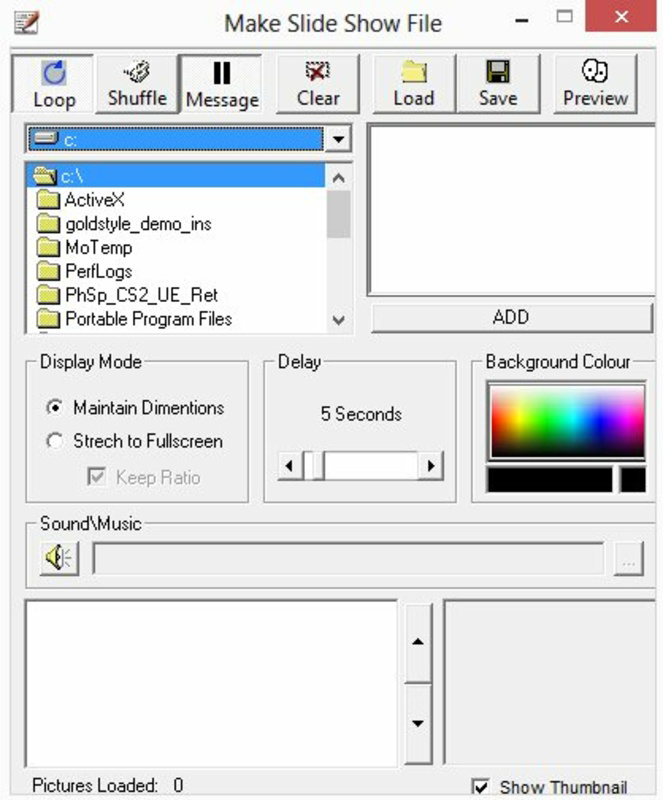
- Customizable Display Settings: Users can adjust background colors and set the duration for which each image is displayed. This feature enables fine-tuned control over pacing and visual flow, making it ideal for presentations requiring specific timing or mood-setting.
- Audio Integration: 10. Slide Show allows the addition of background music using MP3, MID, and WAV audio files. This feature enhances the emotional tone of the slideshow and helps synchronize visuals with music, creating a more immersive experience.
- User-Friendly Interface: The app features an intuitive layout that simplifies navigation and editing. Even users with limited technical experience can create and modify slideshows with ease, focusing on creative expression rather than technical setup.
For example, a user might create a birthday slideshow by selecting family photos, setting each image to display for 5 seconds, choosing a soft background color, and adding a favorite song. Another scenario involves a small business owner using the app to present product images with a consistent audio track during a client meeting. The app’s straightforward functionality ensures that these tasks can be completed efficiently, regardless of the user’s technical proficiency.
Interface, UX & Performance
The interface of 10. Slide Show is designed with simplicity and accessibility in mind. The layout appears clean and uncluttered, with clearly labeled options for adding images, adjusting settings, and managing audio. Navigation is linear and predictable, minimizing the risk of user confusion during the creation process.
Visual elements are minimal yet effective, focusing on functionality over decorative design. The app’s responsiveness appears consistent across different screen sizes, though the developer did not list formal performance metrics. Users can expect smooth transitions between steps, with minimal lag during image loading and playback, especially on devices with standard processing capabilities.
Although the developer did not list formal performance metrics, the app’s long availability suggests a stable runtime and consistent behavior under normal usage conditions. Stability during extended playback sessions is likely maintained through efficient resource handling, though detailed information on memory usage or battery impact was not provided. Overall, the user experience prioritizes ease of use and immediate results, aligning with the app’s purpose as a lightweight productivity tool.
Platform Compatibility & Technical Requirements
10. Slide Show is available on both Android and iOS platforms, making it accessible to a broad range of smartphone users. The app supports multiple operating systems, though specific version requirements were not listed by the developer. The file size is not specified, which may indicate a lightweight footprint, but users should verify compatibility with their device’s storage and system version.
Compatibility information was not fully disclosed, and the developer did not specify minimum OS requirements or hardware specifications. This lack of detail means users should exercise caution when installing on older or less common devices. However, the app’s release date in 2013 suggests it was designed for early mobile operating systems, which may impact performance on newer platforms without updates.
Pros and Cons
Pros
- Supports multiple image formats without requiring conversion
- Offers customizable display timing and background settings
- Includes audio integration with common music file types
- Intuitive interface suitable for users of all experience levels
- Accessible for both personal and professional use cases
Cons
- Specific OS version requirements were not listed
- File size and performance metrics were not disclosed
- No information on update frequency or developer support
- Compatibility with newer devices may be uncertain
- Limited visual customization options beyond basic settings
FAQ
Is 10. Slide Show available for both Android and iOS?
Yes, the app is available on both Android and iOS platforms, though specific version compatibility was not detailed by the developer.
Can I use my own music in the slideshow?
Yes, 10. Slide Show supports audio files in MP3, MID, and WAV formats, allowing users to add personal music tracks to their presentations.
Does the app support video files?
The app’s documentation does not mention video file support. It is designed primarily for image-based slideshows using JPG, GIF, and BMP formats.
How do I update the app?
Updates are typically available through the official app store. Users should check their device’s app store for the latest version.
Is the app secure to download and install?
As a long-standing app available through official app stores, 10. Slide Show is considered secure for download and installation when obtained from trusted sources.
Final Thoughts
10. Slide Show stands out as a reliable, no-frills tool for creating visually engaging presentations on mobile devices. Its straightforward interface, support for common image and audio formats, and customizable display settings make it a valuable utility for users who need to share visual content quickly and effectively. While the lack of detailed technical information may raise questions about compatibility with modern devices, the app’s enduring presence suggests a functional and stable core.
It is particularly suited for individuals who prioritize simplicity and immediate results—such as families creating photo memories, educators preparing classroom visuals, or small business owners delivering product showcases. For those seeking a lightweight, mobile-first solution for image-based storytelling, 10. Slide Show offers a practical and accessible option.
Despite its age, the app remains relevant in a market that values efficiency and ease of use. Download 10. Slide Show now to enhance your visual presentations with music and custom settings.
Guides & Tutorials
How to install 10. Slide Show
- Click the Download button above.
- Once redirected, accept the terms and click Install.
- Wait for the 10. Slide Show download to finish on your device.
How to use 10. Slide Show
This software is primarily used for its core features described above. Open the app after installation to explore its capabilities.
User Reviews
No reviews yet. Be the first to share your experience.
You may also like
more
Que no te pillen¡
About !Que no te pillen¡Reviewed by Jason A. BilbreyShow MoreShow Less

3D Combat Zone
About 3D Combat ZoneOriginally released in 1983, 3D Combat Zone immerses players...

666: El día del portal
About 666: El día del portalOn June 6, 2006, Agent P. Stone uncovers a sinister...

80 in 1 Best Flash games
About 80 in 1 Best Flash games 80 in 1 Best Flash games is a collection of 80 fl...

ABYSS SEEKERーーWhat Do You See Deep in The Abyss
About ABYSS SEEKERーーWhat Do You See Deep in The AbyssIn ABYSS SEEKER, players...

ACA NEOGEO THE KING OF FIGHTERS 2002 for Windows
About ACA NEOGEO THE KING OF FIGHTERS 2002 for WindowsTHE KING OF FIGHTERS 2002,...